When a page is not indexing in Google, I do not start by repeatedly clicking Request Indexing in Google Search Console.
I start by asking a more useful question:
Why is Google not indexing this URL?
I am Alok Kumar, and indexing diagnostics are one part of the technical SEO work I handle. In my experience, an indexing problem is usually a symptom. The actual cause might be discovery, crawlability, a noindex directive, canonicalisation, rendering, duplicate content, weak page value, or a much larger site-wide problem.
Google itself separates crawling from indexing. A page is considered indexed after Googlebot has visited it, analysed its content and meaning, and stored it in Google’s index. Importantly, being crawlable does not guarantee that a URL will be indexed.
My diagnostic sequence is:
Confirm → Discover → Crawl → Index → Canonicalise → Render → Evaluate → Fix → Verify
Here is how I work through it.
Step 1: Confirm That There Is Actually an Indexing Problem
Not ranking and not being indexed are two different problems.
A page can be indexed but rank poorly because of search intent, competition, content quality, authority, internal linking, or other factors. Before changing anything, I first establish whether the URL is actually absent from Google’s index.
Start With URL Inspection
For an individual URL, I use the URL Inspection tool in Google Search Console.
I look at:
- whether the URL is on Google;
- the last crawl date;
- whether crawling is allowed;
- whether indexing is allowed;
- the user-declared canonical;
- Google’s selected canonical;
- page fetch information;
- rendered HTML where further investigation is necessary.
Google recommends URL Inspection specifically for troubleshooting why a particular page is not appearing in Google and for validating fixes afterward. Read Google’s URL Inspection documentation
Then Check the Page Indexing Report
For a wider pattern, I use the Page Indexing report.
It helps identify whether an issue is isolated to one URL or affecting an entire page type, directory, template, or site.
Common statuses include:
- Crawled, currently not indexed
- Discovered, currently not indexed
- Duplicate without user-selected canonical
- Alternate page with proper canonical
- Excluded by noindex
- Blocked by robots.txt
- Page with redirect
- Not found (404)
- Soft 404
- Server error
One useful detail is that Google’s Page Indexing report provides comprehensive totals for known URLs, even though the interface may only expose up to 1,000 example URLs for investigation.
That distinction became particularly important in the OutreachClub case I will explain later.
Step 2: Check Whether Google Can Discover the Page
Before Google can index a page, it first needs to know the URL exists.
I check how the page is being discovered.
My Main Discovery Checks
I look for:
- inclusion in the XML sitemap;
- internal links from relevant pages;
- navigation and breadcrumb links;
- orphan URLs;
- broken internal links;
- incorrect redirects;
- pages accessible only after user interaction;
- whether the URL is buried too deeply in the site architecture.
For an important service, product, category, or editorial page, I generally do not want the XML sitemap to be its only discovery mechanism.
Google notes that for smaller websites with good navigation, it should generally be possible to move through links from one page to other important pages. It also specifically calls out unlinked pages as URLs that may require additional discovery support.
A sitemap helps discovery. It does not compensate for poor information architecture.
Step 3: Check Crawlability
Once I know Google can discover the URL, I check whether Googlebot can access it correctly.
Verify Access Controls
robots.txt
I check whether an important directory, resource, or URL pattern has accidentally been blocked.
One common misunderstanding is treating robots.txt as an indexing-control mechanism.
It is primarily a crawling control. Google explains that a URL blocked by robots.txt can sometimes still be indexed based on information from other sources, even though Google cannot crawl its content.
If I genuinely do not want a page indexed, I use the appropriate indexing directive rather than assuming robots.txt will remove it.
HTTP Status Codes
For a normal indexable page, I expect a valid 200 OK response.
I investigate:
- 3xx redirects;
- redirect chains;
- redirect loops;
- 404 responses;
- soft 404s;
- 5xx server errors;
- intermittent availability.
A page that looks fine in a browser can still behave differently for crawlers, particularly when caching, firewalls, CDN rules, bot protection, or server configuration is involved.
Check Server and Security Rules
After a website hack or security cleanup, this becomes especially important.
It is possible to secure a website so aggressively that legitimate crawlers are also affected. I therefore check whether Googlebot can still access the pages and resources that matter.
Step 4: Check Whether Indexing Is Allowed
A URL can be perfectly crawlable but explicitly tell Google not to index it.
I Check Three Areas First
Meta Robots
I look for accidental:
noindex
directives, especially after:
- staging-to-production releases;
- redesigns;
- migrations;
- plugin changes;
- template updates.
X-Robots-Tag
Indexing directives can also be sent through HTTP headers.
This is easy to miss if someone only inspects the visible HTML.
Canonical Tags
Canonical problems deserve more attention because they can make a valid page appear to have an indexing problem when Google has simply selected another URL.
I compare:
- the page’s declared canonical;
- Google’s selected canonical;
- sitemap URLs;
- redirects;
- internal links;
- protocol and hostname versions;
- parameter variations.
Google describes canonicalisation as the process of choosing one representative URL from duplicate or very similar pages. Google can consider redirects, sitemap inclusion, HTTPS, and rel=”canonical” signals, but a canonical declaration is still a signal rather than an absolute command. Read Google’s canonicalisation guidance
Interestingly, hacking itself can also create canonicalisation problems. Google’s current documentation notes that malicious attacks can insert redirects or cross-domain canonical tags that point toward spam content.
Step 5: Check What Google Can Actually Render
The page that I see in Chrome is not automatically the same page Google processed.
For JavaScript-heavy sites, I may compare:
- the original HTML;
- Google’s rendered HTML;
- the live URL test;
- visible main content;
- internal links after rendering;
- resources that fail to load.
What I Look for in URL Inspection
If necessary, I use Test Live URL and inspect the tested page.
I want to know whether the important content, links, headings, metadata, and page structure Google needs are actually available after rendering.
This is particularly useful when the initial HTML contains little content and JavaScript builds most of the page afterward.
A rendering problem can look like a content-quality problem because Google may technically fetch the URL but fail to receive the complete page experience I intended.
Step 6: Diagnose “Crawled, Currently Not Indexed”
This status is frequently misunderstood.
If Google says Crawled, currently not indexed, the important part is that Google has already fetched the URL.
That means repeatedly requesting another crawl is rarely the first thing I focus on.
I investigate:
- duplicate or near-duplicate content;
- thin pages;
- weak differentiation between similar URLs;
- templated pages with very little unique value;
- low-value archives;
- internal search pages;
- poor internal linking;
- conflicting canonical signals;
- programmatically generated URLs;
- whether the page genuinely deserves to exist as a separate search result.
This is where technical SEO and content quality overlap.
A page can be technically perfect and still not be selected for indexing.
Step 7: Diagnose “Discovered, Currently Not Indexed”
This is a different problem.
Google knows that the URL exists but has not yet crawled it.
I therefore look more closely at:
- internal discovery;
- sitemap quality;
- server capacity;
- excessive URL generation;
- faceted navigation;
- parameters;
- crawl traps;
- low-value page types;
- site-wide quality patterns.
I also avoid assuming every discovered URL deserves to be indexed.
A website generating thousands of unnecessary URL combinations can make Google’s job harder without creating any additional value for users.
Step 8: Look for a Site-Wide Indexing Problem
Sometimes the URL I am inspecting is not the real problem.
The real problem is that the website has created thousands of URLs Google never needed to process.
This is where I compare:
- crawlable URL count;
- indexable URL count;
- sitemap URLs;
- indexed pages;
- excluded URLs;
- duplicate pages;
- parameters;
- tag and archive pages;
- search-result URLs;
- old URLs;
- hacked or spam URLs.
This is exactly what happened with OutreachClub.
Real Case Study: How I Fixed OutreachClub After a Website Hack
OutreachClub is one of my independent projects.
The site was hacked, and I identified roughly 1,000 unwanted pages created through the compromise.
But the problem visible in Search Console was much larger than the number of spam pages I had manually identified.
What the Hack Did to the Site
The compromise created URLs that had nothing to do with the actual purpose of OutreachClub.
For SEO, the concern was not simply that unwanted pages existed.
Those URLs could:
- be discovered by Google;
- enter Google’s crawl queue;
- appear in indexing reports;
- compete with legitimate URLs for attention;
- introduce irrelevant content into the site’s search footprint;
- create confusing internal or canonical signals;
- appear in search before Google processed the cleanup.
Google has a specific security classification for this behaviour called Hacked: URL injection, where an attacker creates new pages on a compromised site. Google’s recommendation is to remove the unwanted pages and the files or functions that allowed them to be created. Google Search Console Security Issues guidance
How I Approached the Recovery
I did not treat the problem as “remove 1,000 URLs and wait.”
I treated it as a website recovery project.
1. I Removed the Compromise and Secured the Site
The first priority was stopping the generation of new unwanted pages.
SEO cleanup is pointless if the underlying vulnerability remains active.
Only after the hacked content and source of the problem were addressed did I move fully into indexing recovery.
2. I Redesigned the Website
Instead of restoring the same structure and stopping there, I redesigned OutreachClub.
The objective was to give the legitimate site a cleaner foundation with:
- clearer information architecture;
- improved navigation;
- stronger page hierarchy;
- better internal linking;
- a cleaner content structure;
- clearer service pages;
- fewer unnecessary URLs.
The redesign itself was not an “indexing trick.”
It gave Google a cleaner set of legitimate pages to discover and process after the hacked content had been removed.
3. I Improved the Content I Actually Wanted Indexed
Removing low-quality URLs is only half the job.
I also worked on the pages I wanted Google to retain.
I reviewed:
- search intent;
- headings;
- page structure;
- content depth;
- titles and descriptions;
- internal linking;
- unnecessary or outdated pages;
- whether each important URL had a clear purpose.
This is a principle I use in technical SEO consulting generally:
Do not only remove what should not be indexed. Improve what should be indexed.
4. I Extracted the Hacked URLs and Used GSC Removals
I collected the unwanted URLs I could identify and submitted relevant URLs through the Google Search Console Removals tool.
This helped remove those URLs from Google Search more quickly while the permanent cleanup was being processed.
There is an important limitation here.
Google states that a Search Console removal request is temporary and normally lasts about six months. It does not permanently delete the URL from Google’s systems by itself. Permanent removal requires an additional action such as removing the page so that it returns 404 or 410, protecting the content, or using an appropriate noindex directive. Read Google’s Search Console Removals guidance
For hacked URLs that had no legitimate replacement, I did not want to redirect everything to the homepage. Those URLs needed to disappear properly.
5. I Cleaned the Sitemap and Resubmitted the Legitimate Site
The XML sitemap should represent the URLs I genuinely want search engines to discover.
After cleanup, I focused the sitemap on valid, canonical pages and resubmitted the legitimate URL set.
For larger batches of URLs, Google recommends sitemap submission as the appropriate discovery method. For a small number of individual pages, URL Inspection can be used to request another crawl.
6. I Requested Indexing Only After the Pages Were Ready
Once the redesigned pages were technically accessible and the content was improved, I requested indexing for priority URLs where appropriate.
This order matters.
Request Indexing is not a repair button.
Google explicitly says that requesting a crawl does not guarantee indexing. Crawling can take anywhere from a few days to a few weeks, and repeated requests for the same URL do not make Google crawl it faster.
I fix the page first.
Then I ask Google to process the improved version.
7. I Monitored the Recovery in Search Console
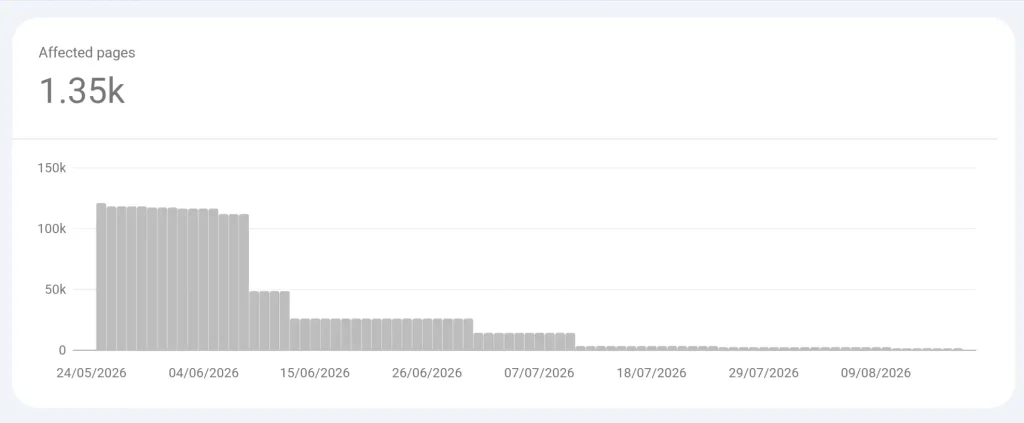
This was the most important verification step.
The Search Console graph I captured showed the number of pages associated with the affected issue falling from roughly 120,000 in late May 2026 to about 1,350 by August 2026.
That does not mean the hacker manually created 120,000 unique spam pages.
Search Console can group URL variants and other discovered URLs into an issue, while its displayed example list can also be smaller than the total count. The important evidence here is the direction of the report.
The affected-page count kept falling as Google recrawled the site and processed the cleanup.
Today, the redesigned OutreachClub site is live and its legitimate pages are indexing again based on my ongoing monitoring.
For me, that graph is important because I do not consider an indexing problem solved simply because the website looks correct to users.
I want to see the recovery reflected in Google’s own data.
Step 9: Fix the Root Cause Before Requesting Indexing
One of the most common indexing workflows I see is:
- URL is not indexed.
- Request indexing.
- Wait.
- Request indexing again.
That skips the diagnosis.
If the page still has:
- an accidental noindex;
- a bad canonical;
- weak internal discovery;
- duplicate content;
- rendering problems;
- poor server responses;
- low page value;
another indexing request does not solve the underlying problem.
I treat URL Inspection as a verification and processing tool, not as a substitute for fixing the website.
Step 10: Verify the Fix
Technical SEO is not complete when the developer says, “Fixed.”
I verify the production behaviour.
My Post-Fix Checks
I usually confirm:
- final HTTP status;
- robots directives;
- meta robots;
- canonical URL;
- rendered content;
- important internal links;
- XML sitemap inclusion;
- URL Inspection result;
- Page Indexing report trend;
- Security Issues status where relevant.
For a hacked website, I also check the Security Issues report because Google recommends fixing the issue across the entire site and requesting a review when applicable. Google notes that security reviews can take several days or weeks.
I separate three milestones:
Implementation completed → Google processed the change → Search performance responded
Those are not the same thing.
My Indexing Diagnosis Framework
Here is the order I use when an important page is missing from Google’s index:
| Order | Check | Question I Am Answering |
| 1 | Confirm status | Is this actually an indexing problem? |
| 2 | Discovery | Does Google know the URL exists? |
| 3 | Crawlability | Can Googlebot access it? |
| 4 | Indexability | Is Google allowed to index it? |
| 5 | Canonicalisation | Which URL are we asking Google to keep? |
| 6 | Rendering | Can Google see the important content? |
| 7 | Page value | Is the URL distinctive enough to deserve indexing? |
| 8 | Site-wide patterns | Is unnecessary URL generation creating index noise? |
| 9 | Remediation | Have I fixed the actual cause? |
| 10 | Verification | Can I prove that Google processed the fix? |
The order is important because it stops me from jumping straight to content changes when the actual problem is robots.txt, or blaming crawl budget when the page is canonicalised elsewhere.
Indexing Is a Requirement, Not a Ranking Guarantee
Getting a page indexed is not the end goal.
It simply means the page is eligible to participate in Google Search.
Technical accessibility, content quality, internal architecture, search intent, and external authority still need to work together. I treat authority as a separate problem, which is why I also evaluate link opportunities using the framework in my article on backlink quality beyond DA and DR.
When I diagnose an indexing issue, I therefore do not start with:
“How do I force Google to index this page?”
I start with:
“What is preventing or discouraging Google from indexing it?”
Once I separate discovery, crawling, indexability, canonicalisation, rendering, page quality, and site-wide URL problems, the investigation becomes much clearer.
And once the fix is implemented, I verify it with data before I call the problem resolved.