
Before starting a backlink outreach campaign, there’s one question I regularly need to answer:
Which websites from my new prospect list have we already used?
It sounds like a small task, but when you’re managing hundreds or thousands of websites, checking every domain against historical records becomes repetitive.
We were already handling this through Google Sheets. It worked, but I wanted a simpler way to compare lists without relying on spreadsheet formulas or switching between multiple sheets.
So we built a free Bulk Domain Checker.
The idea was straightforward: paste previously used domains into one box, paste new prospects into another, run the comparison, and get a clean list of websites that haven’t appeared in your records.
The tool is now available on AlokBlog.
Try my Free Bulk Domain Checker
In this article, I’ll explain how to use it, the technical challenges we solved, how we tested it, and where it fits into my link-building workflow.
The Problem: Managing Previously Used Domains in Link-Building Campaigns
Finding relevant websites is only one part of backlink prospecting.
Before outreach, I also need to check whether a website has already appeared in our backlink records.
Imagine that an SEO team has 5,000 historical domains and discovers another 500 potential websites through competitor research, industry searches, and prospecting tools.
The team needs to identify which of those 500 domains are genuinely new to its records.
Checking them one by one is inefficient. Even when using Google Sheets, inconsistently formatted URLs can complicate comparisons.
For example, the following entries all refer to the same normalized hostname:
example.comwww.example.comhttps://example.com/blog/https://www.example.com/article/?ref=newsletter
A basic text comparison may treat these as different entries unless the data is cleaned first.
That was the first problem I wanted to solve.
The second was making the result easy to use. I didn’t want to spend time reviewing rows manually when the tool could identify previously used domains automatically.
This fits into a broader industry challenge. In Editorial.Link’s 2026 survey of 518 SEO professionals, 67.2% reported difficulty scaling link building without sacrificing quality.
That is a self-reported industry finding, not a measurement of our tool’s performance. But it reflects why I value workflows that reduce repetitive work and keep records organised.
What Is the Free Bulk Domain Checker?
The Bulk Domain Checker is a free, browser-based tool for comparing a list of candidate websites against a list of previously used domains.
It was designed primarily for SEO professionals, link builders, outreach specialists, and teams maintaining publisher databases.
The checker has two main inputs:
Historical / Already Used Domains: Websites that already appear in your records.
Domains to Check: New websites you want to compare against those records.
After running the comparison, each candidate receives one of three statuses:
| Status | Meaning |
|---|---|
| New | The normalized hostname does not appear in your supplied historical list |
| Already Used | The normalized hostname matches a historical entry |
| Invalid | The supplied entry is not a supported valid domain or URL |
An important distinction: New does not mean the domain is available for registration or that it is a high-quality backlink opportunity.
It only means the hostname wasn’t found in the historical list you provided.
The tool helps with domain-history comparison. Website quality evaluation remains a separate step.
How to Use the Free Bulk Domain Checker: Step-by-Step
You don’t need to create an account, install a browser extension, or connect your Google Sheets.
Here’s how to run a comparison.
Step 1: Prepare Your Historical Domain List
Start by opening the Bulk Domain Checker.
In the first box, Historical / Already Used Domains, paste the websites from your existing backlink records.
For example:
example.com
saasdaily.com
techpublication.co.uk
Each domain or URL should be on a separate line.
You can copy these records from Google Sheets, Excel, or another list-management system.
I recommend keeping your historical list accurate and updated. If a previously used website is missing, the checker has no way of knowing that you’ve already worked with it.
You can leave the historical field empty, but in that case every valid candidate will be considered new to the supplied history.
Step 2: Add the Domains You Want to Check
Now move to the Domains to Check box.
Paste the new websites collected during prospecting.
For this demonstration, I’ll use:
https://www.example.com/article/?ref=newsletter
blog.example.com
newtechblog.com
newtechblog.com
???
Notice that the list contains:
- A complete URL with a path and query parameter
- A subdomain
- A new website
- A repeated candidate
- An invalid entry
These variations help demonstrate what the checker actually does.
Step 3: Click Check Domains
Click Check Domains to run the comparison.
The tool normalizes the inputs, compares each valid candidate against the historical list, and displays the results.
For this example, the expected output is:
| Original input | Normalized domain | Status |
|---|---|---|
https://www.example.com/article/?ref=newsletter | example.com | Already Used |
blog.example.com | blog.example.com | New |
newtechblog.com | newtechblog.com | New |
newtechblog.com | newtechblog.com | New |
??? | Invalid | Invalid |
The repeated newtechblog.com entries remain visible in the full results because the table preserves candidate rows.
However, the tool counts each valid hostname only once in its unique-domain statistics.
For this example, the summary would show:
| Metric | Result |
|---|---|
| Submitted entries | 5 |
| Unique valid domains | 3 |
| New domains | 2 |
| Already used | 1 |
| Invalid entries | 1 |
This distinction matters when comparing larger lists. Submitted entries represent rows, while the unique-domain counters represent distinct normalized hostnames.
Step 4: Filter New, Already Used, and Invalid Domains
After the comparison finishes, you’ll see a results table.
You can use the Status dropdown to display only:
- New
- Already Used
- Invalid
- All statuses
For example, when I’m preparing a fresh outreach list, I can select New to focus on candidates missing from our history.
If I want to understand why certain entries weren’t processed, I can switch to Invalid.
There’s also a Search results field, which lets users search by hostname or original input.
One detail worth understanding: filtering changes what you see in the results table, but it doesn’t change the underlying CSV exports.
Step 5: Copy or Export Your Results
Once you’ve completed the comparison, you have three useful options.
Copy New Domains
This copies the unique new hostnames, making it easy to paste them into another spreadsheet or prospecting workflow.
Download New Domains CSV
This exports only the unique new domains.
For our sample comparison, the new-domain export would contain:
Domain
blog.example.com
newtechblog.com
Although newtechblog.com appeared twice in the candidate list, it appears only once in this export.
Download Results CSV
This exports the complete comparison, including the original input, normalized hostname, and status.
I prefer the full export when I need an audit trail. The new-domain export is more useful when I simply want to continue researching fresh prospects.
A Real Example From My Bulk Domain Checker
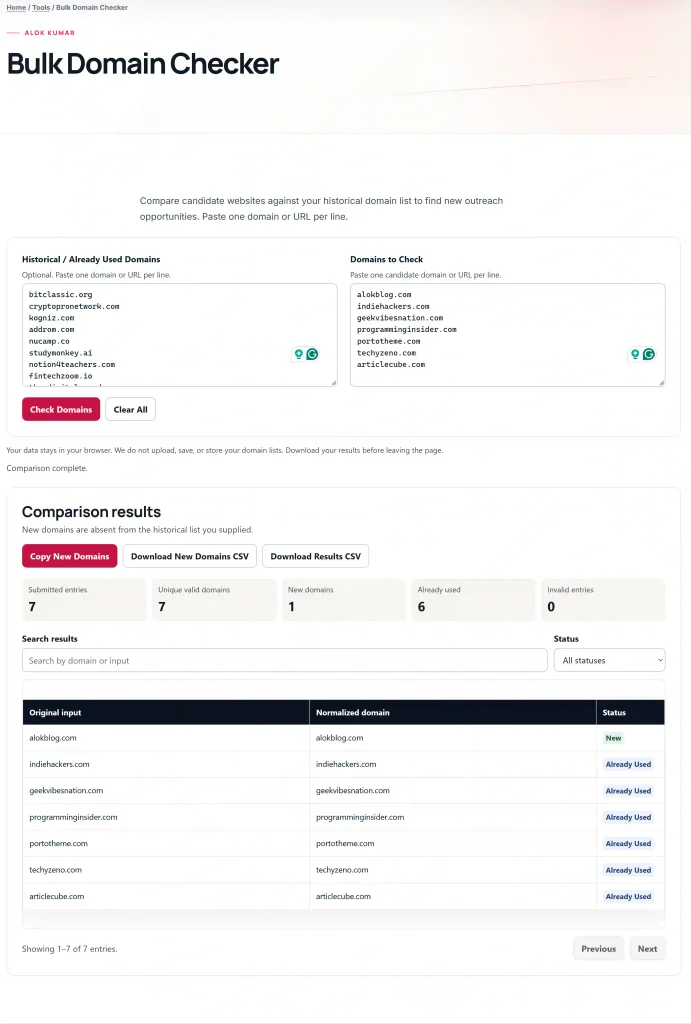
I also tested the tool with a separate set of website records, shown in the screenshot accompanying this article.
The results were:
| Metric | Result |
|---|---|
| Submitted entries | 7 |
| Unique valid domains | 7 |
| New domains | 1 |
| Already used | 6 |
| Invalid entries | 0 |
In this example, the tool identified alokblog.com as the only new hostname in the candidate list.
The other six websites were already present in the supplied historical records.
Instead of manually checking seven entries, I could see the result immediately and filter the table to isolate the new domain.
This is a small demonstration, but it shows the tool’s intended purpose clearly.
The same comparison process can be applied to much larger prospect lists.
How We Solved the Biggest Technical Challenge: Domain Normalization
Building the interface wasn’t the most difficult part.
The important challenge was ensuring that different URL formats for the same website produced the correct comparison result.
We developed the normalization logic using JavaScript.
You can review the actual implementation in the normalize.js source file on GitHub.
Normalizing Different URL Formats
Before comparing a candidate with historical records, the tool converts the input into a consistent hostname.
For example:
| Original input | Normalized hostname |
|---|---|
www.example.com | example.com |
https://example.com/blog/ | example.com |
https://www.example.com/?ref=seo | example.com |
EXAMPLE.COM | example.com |
https://www.example.co.uk/ | example.co.uk |
The logic removes components that aren’t relevant to this particular comparison, including protocols, URL paths, query parameters, fragments, ports, and a leading www.
It also converts the hostname to lowercase.
The original URL remains available in the results table, so you can see what was submitted.
Why We Keep Subdomains Separate
I didn’t want the checker to automatically combine every subdomain with its parent domain.
For example:
blog.example.com
and
example.com
are treated as separate hostnames.
There may be situations where the parent website and a subdomain operate as different publishing properties.
The same principle applies to other subdomains. The tool removes a leading www, but it doesn’t strip every subdomain.
This is a deliberate matching rule, not a guarantee that different subdomains belong to independent publishers.
Supporting International Domains and Public Suffixes
We also accounted for internationalized domain names.
The checker converts supported Unicode hostnames into their ASCII representation, known as Punycode, before matching them.
It uses the JavaScript tldts library and public suffix information to validate hostnames.
This is useful for country-specific domains and multi-part suffixes such as .co.uk.
For example, example.co.uk is a valid domain, but a public suffix by itself is not treated as a normal website hostname.
These checks help prevent malformed inputs from being accepted simply because they contain a dot.
How the Comparison Logic Works
Once the inputs are normalized, the actual comparison is relatively straightforward.
The JavaScript code builds a set of valid hostnames from the historical list.
It then processes each candidate and checks whether the normalized hostname exists in that set.
The decision works like this:
- If the candidate is invalid, mark it Invalid.
- If the hostname exists in the historical set, mark it Already Used.
- Otherwise, mark it New.
We use JavaScript Set objects to manage historical hostnames and unique result counts.
This also helps handle repeated entries without counting the same hostname multiple times.
The full comparison implementation is available in compare.js on GitHub.
Handling Invalid Historical Entries
The tool handles invalid historical records separately from invalid candidates.
If a historical list contains some valid domains and some invalid entries, the checker can use the valid domains and warn about the invalid lines.
If the entire non-empty historical list is invalid, the user must correct or clear it before running the comparison.
I consider this important because an invalid history shouldn’t silently produce a misleading result where every candidate appears new.
Keeping CSV Exports Reliable
The exports also required some attention.
The checker handles CSV formatting and escapes values so inputs containing special characters do not break the file structure.
It also takes precautions against spreadsheet formula interpretation.
The implementation is available in the CSV export source code.
These are smaller development details, but they matter when people download the results and open them in spreadsheet applications.
How We Tested 20,000 Candidate Domains Against 10,000 Historical Domains
I didn’t want to validate the tool using only a few sample websites.
We added automated tests covering normalization, comparison results, invalid entries, and CSV exports.
One test checks 20,000 candidate entries against 10,000 historical domains.
The expected result is:
| Test metric | Expected result |
|---|---|
| Historical domains | 10,000 |
| Candidate entries | 20,000 |
| Already used domains | 10,000 |
| New domains | 10,000 |
| Invalid entries | 0 |
The automated test checks that the comparison produces those counts and identifies the correct new-domain entries.
You can inspect the large-list test in the public repository.
This verifies the comparison logic for that test case. It is not a performance benchmark or a promise that every device will process 20,000 domains in a particular amount of time.
Browser and Mobile Testing
We also included browser-based tests for the finished tool.
These cover the interface, filtering, clipboard behaviour, exports, clearing results, offline functionality, and mobile accessibility.
The repository uses Playwright for browser testing and GitHub Actions for its automated build and test workflow.
From a practical perspective, this was important because the checker needed to work as a usable tool, not just as a JavaScript function.
Why I Made the Bulk Domain Checker Free and Open Source
The tool started with a problem we were already solving internally.
I wanted to make that workflow accessible without requiring users to maintain a complicated spreadsheet or purchase another subscription for a simple comparison.
That’s why the Bulk Domain Checker is free to use.
There is no account registration or paid plan required for the comparison.
The source code is also published under the MIT license on GitHub.
Developers can inspect the implementation, run the tests, suggest improvements, or use the code in accordance with the license.
How the Tool Handles Your Data
The comparison runs locally in the browser.
The checker does not upload the pasted domain lists to a separate processing server or save them in an account.
For the standalone version, the required assets are bundled into a single HTML file, allowing the comparison to work offline.
The website hosting the tool may have its own normal website infrastructure, but the comparison engine itself doesn’t need to send the lists elsewhere.
One practical limitation is that the tool does not persist your results for later sessions.
Download or copy your results before leaving the page.
Using the Tool Offline
If you prefer a standalone version, you can download it from the Bulk Domain Checker v0.1.0 GitHub release.
Download the ZIP file, extract it, and open the included index.html in your browser.
No server setup is required to use the prebuilt standalone version.
The hosted WordPress version on AlokBlog provides a convenient alternative for users who simply want to open the page and run a comparison.
How I Use the Tool in My Link-Building Prospecting Workflow
The Bulk Domain Checker solves one part of my backlink prospecting process.
It doesn’t replace proper website qualification.
When working on a campaign, I still start by finding publications relevant to the destination page.
For example, if I am building links to a software development service page, I would prioritise SaaS, software engineering, developer, and relevant technology publications.
I then evaluate traffic quality, ranking keywords, geographic relevance, and traffic trends.
I have explained those broader evaluation principles in How I Evaluate Backlink Quality Beyond DA and DR.
After that initial research, I use the Bulk Domain Checker to compare candidate websites against our previous domain records.
Once the new domains are identified, I can continue with contact research and outreach.
The complete process looks like this:
- Find websites relevant to the target page.
- Evaluate their traffic, niche relevance, and audience.
- Compare them against previously used domains.
- Export new prospects.
- Review the final list and identify suitable publisher contacts.
- Begin legitimate editorial outreach.
A website marked New still needs to pass the other qualification checks.
Likewise, a website marked Already Used is not automatically unsuitable for another legitimate editorial reference. It simply means I should review the existing relationship before proceeding.
My broader link-building and outreach approach focuses on relevant publications, useful content, transparent communication, and editorial value.
Google’s link spam policies also make it clear that links created primarily to manipulate search rankings violate its guidelines.
A domain comparison tool can make outreach operations more organised. It cannot turn an irrelevant or manipulative placement into a good one.
What the Bulk Domain Checker Does Not Do
I want users to understand the tool’s scope before using it.
The current version does not check:
| Feature | Supported? |
|---|---|
| Compare new domains with historical records | Yes |
| Normalize website URLs | Yes |
| Identify previously used domains | Yes |
| Filter results by status | Yes |
| Export new and full results as CSV | Yes |
| Check Domain Rating or Domain Authority | No |
| Estimate organic traffic | No |
| Analyse backlinks | No |
| Check domain registration availability | No |
| Confirm whether a website is live | No |
| Automatically import Google Sheets data | No |
It is also not currently designed to provide a separate report of duplicates within the candidate list itself, although repeated candidate rows remain visible and new-domain exports are deduplicated.
For me, keeping the tool focused is intentional.
It should answer one specific question accurately rather than attempt to replace a full SEO research platform.
Frequently Asked Questions
Is the Bulk Domain Checker completely free?
Yes. You can use the hosted Bulk Domain Checker without a subscription or account. The standalone source code is also available under the MIT license.
Can I compare thousands of domains at once?
The tool accepts multiple domains in a single comparison.
Its automated tests include a case with 20,000 candidate entries and 10,000 historical domains. Actual performance will depend on your browser and device.
Can I use domains from Google Sheets?
Yes.
Copy the previously used domains from your sheet into the historical list, then paste your new prospects into the second box.
The public version does not automatically synchronize with Google Sheets.
Does the tool store my domain lists?
The comparison logic processes the entered lists in browser memory. It does not save them to an account or upload them for server-side comparison.
Export your results before leaving the tool.
Can I filter only new domains?
Yes.
Use the Status dropdown and select New to show the new-domain rows.
You can also use Copy New Domains or Download New Domains CSV to get a unique list.
Does it check whether domains are available to register?
No.
The tool compares domains against your own historical list. It does not perform domain registration or DNS availability checks.
Try My Free Bulk Domain Checker
The project started with a repetitive task in our link-building workflow.
We needed a reliable way to compare new websites against historical backlink records without repeatedly checking different URL formats in Google Sheets.
Building the Bulk Domain Checker gave us a simpler, reusable process.
If you manage backlink prospects, outreach records, or publisher lists, you can try it yourself.
Use the Free Bulk Domain Checker
The source code and standalone release are also available on GitHub.
For me, this project reinforces a simple lesson: useful SEO automation doesn’t always need to be complicated. Sometimes the best tool is one that removes a repetitive task from a workflow you already understand.